
Accounting Overview
The Accounting module is the financial heart of Ballie. It provides a complete double-entry accounting system designed to help businesses manage revenue, expenses, receivables, payables, banking activities, financial reporting, and compliance from a single workspace.
Whether you are a retailer, service provider, manufacturer, distributor, or multi-location business, Ballie helps you maintain accurate books while generating real-time financial insights.
What You Can Do in Accounting
The Accounting module allows you to:
- Create and manage customer invoices
- Record purchases and supplier bills
- Manage quotations and convert them to invoices
- Create accounting vouchers and journal entries
- Track receivables and payables
- Manage ledger accounts and account groups
- Reconcile bank transactions
- Record prepaid expenses
- Generate financial statements
- Monitor profitability and cash flow
- Maintain a complete audit trail
All accounting transactions follow proper double-entry bookkeeping principles, ensuring your books remain balanced and accurate.
Understanding the Accounting Dashboard
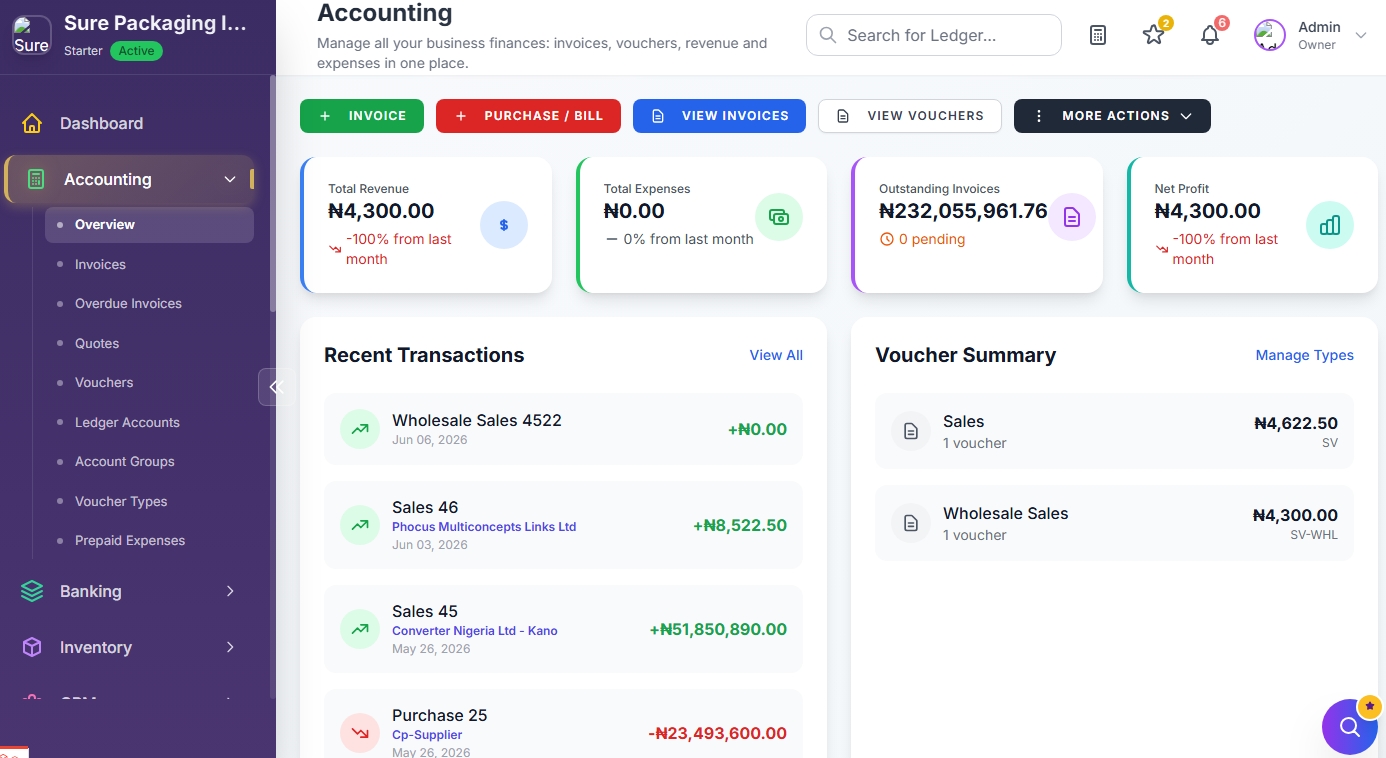
The Accounting Overview page gives you a quick snapshot of your financial performance.
Quick Action Buttons
At the top of the page, you'll find shortcuts to commonly used accounting tasks:
Create Invoice
Create sales invoices for customers.
Use this when:
- Selling products
- Billing customers
- Charging for services
- Recording subscription revenue
Purchase / Bill
Create supplier bills and purchase transactions.
Use this when:
- Buying inventory
- Recording supplier expenses
- Managing vendor liabilities
View Invoices
View, search, edit, print, and manage all invoices.
View Vouchers
Access all accounting vouchers and journal entries.
More Actions
Opens the complete Accounting Actions panel where you can access all accounting tools and financial reports.
Accounting Summary Cards
The dashboard displays key financial metrics including:
Total Revenue
Shows total income generated during the selected period.
Total Expenses
Displays all expenses recorded during the selected period.
Outstanding Invoices
Shows unpaid customer invoices and outstanding receivables.
Net Profit
Displays your current profit or loss position.
Recent Transactions
The Recent Transactions section provides a quick view of:
- Sales invoices
- Purchase transactions
- Receipts
- Payments
- Journal entries
- Other accounting activities
Click View All to access the complete transaction history.
Voucher Summary
The Voucher Summary section shows:
- Voucher types
- Number of vouchers created
- Transaction values
This helps accountants quickly understand accounting activity within the business.
Accounting Sidebar Navigation
The Accounting sidebar provides direct access to all accounting features.
Overview
Returns to the Accounting Dashboard.
Invoices
Manage:
- Sales invoices
- Customer billing
- Invoice status
- Payment tracking
Learn more: Invoices
Overdue Invoices
View all unpaid and overdue customer invoices.
Use this page to:
- Follow up on outstanding payments
- Monitor receivables
- Improve cash flow
Quotes
Create quotations and estimates.
Quotes can later be converted into invoices without re-entering data.
Vouchers
Manage accounting vouchers and financial postings.
Includes:
- Sales vouchers
- Purchase vouchers
- Payment vouchers
- Receipt vouchers
- Journal vouchers
- Credit Note vouchers
- Debit Note vouchers
Ledger Accounts
View and manage your Chart of Accounts.
Examples:
- Cash Accounts
- Bank Accounts
- Revenue Accounts
- Expense Accounts
- Asset Accounts
- Liability Accounts
Account Groups
Organize ledger accounts into categories such as:
- Assets
- Liabilities
- Equity
- Income
- Expenses
Voucher Types
Create custom voucher categories to match your accounting workflow.
Examples:
- Sales Voucher
- Purchase Voucher
- Wholesale Sales
- Retail Sales
- Adjustment Voucher
Prepaid Expenses
Manage expenses paid in advance and automatically allocate them across future accounting periods.
Examples:
- Rent
- Insurance
- Annual Subscriptions
- Software Licenses
All Accounting Actions
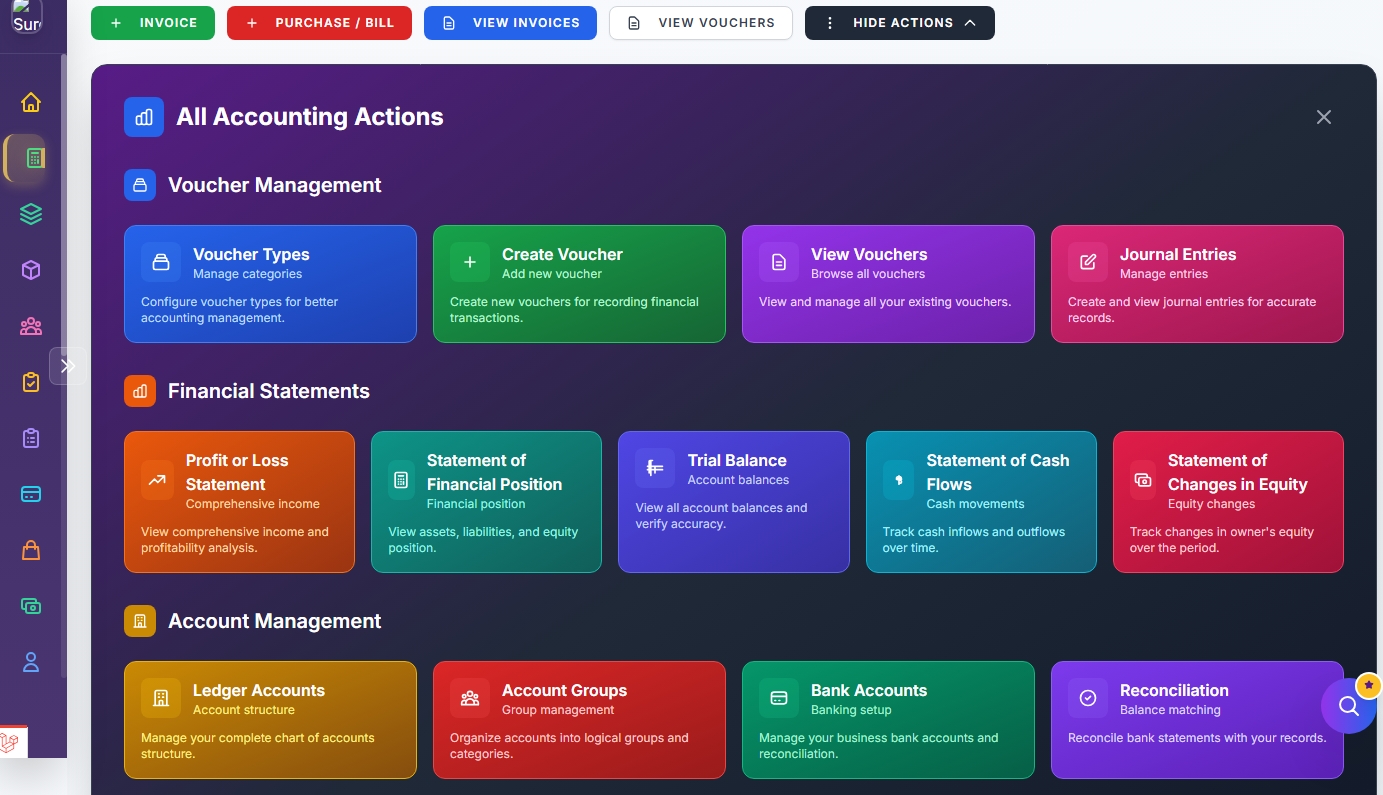
Clicking More Actions opens the Accounting Actions panel.
This panel provides quick access to advanced accounting tools and reports.
Voucher Management
The Voucher Management section contains:
Voucher Types
Configure accounting voucher categories used throughout the system.
Create Voucher
Create accounting vouchers for:
- Sales
- Purchases
- Receipts
- Payments
- Adjustments
View Vouchers
Browse all vouchers created within your company.
Journal Entries
Create manual accounting entries for special transactions and adjustments.
Financial Statements
Generate professional financial reports instantly.
Profit or Loss Statement
Shows:
- Revenue
- Cost of Sales
- Expenses
- Net Profit
Used to measure business performance over a period.
Statement of Financial Position
Also known as the Balance Sheet.
Shows:
- Assets
- Liabilities
- Equity
Used to determine the financial position of the company.
Trial Balance
Displays all ledger balances and helps verify accounting accuracy.
Statement of Cash Flows
Tracks:
- Cash inflows
- Cash outflows
- Operating activities
- Investing activities
- Financing activities
Statement of Changes in Equity
Tracks movements in owner's equity and retained earnings.
Account Management
The Account Management section provides access to your accounting structure.
Ledger Accounts
Manage your Chart of Accounts.
Account Groups
Organize accounts into logical accounting categories.
Bank Accounts
Manage company bank accounts used throughout Ballie.
Reconciliation
Match bank transactions against accounting records to ensure accuracy.
Learn more: Bank Reconciliation
Accounting Workflow Recommendation
For most businesses, we recommend the following workflow:
- Complete onboarding and review your Chart of Accounts.
- Create customers and vendors.
- Create invoices for sales transactions.
- Record supplier bills and purchases.
- Post receipts and payments.
- Reconcile bank transactions regularly.
- Review Profit & Loss and Balance Sheet reports monthly.
- Monitor overdue invoices and outstanding payables.
Best Practices
TIP
Create customers and vendors before raising invoices or bills.
TIP
Perform bank reconciliation at least once per month.
TIP
Review your Profit & Loss Statement regularly to monitor business performance.
TIP
Use voucher types to separate different transaction categories such as retail sales, wholesale sales, subscriptions, and project income.